A browser tabletop that is still being built
Astral Tabletop was a browser VTT known for animated maps; development stopped in 2021 and its servers closed in 2022. TerrainTale is a browser tabletop that is shipping updates now, with the map built as a 3D place rather than an image.
Side by side
| Topic | TerrainTale | Astral Tabletop |
|---|---|---|
| Status | In active development | Closed in 2022 |
| Install | Browser | Browser |
| The map | A 3D scene from a realistic library | Image and animated maps |
| Measuring | Feet with diagonal rule, waypoints and height | Grid tools |
| Initiative and HP | Tracker, HP, conditions, round counter | Supported |
| Fog of war | Yes: a brush the DM paints; players are never sent what it hides; no automatic line of sight | Yes |
| Your data | Scenes export as JSON; server is self-hostable | Gone with the service |
Astral Tabletop is a trademark of its owners and is not affiliated with TerrainTale. Feature notes describe the other product in general terms as we understand it at the time of writing; check its site for current details.
Something that moves instead of maps that move
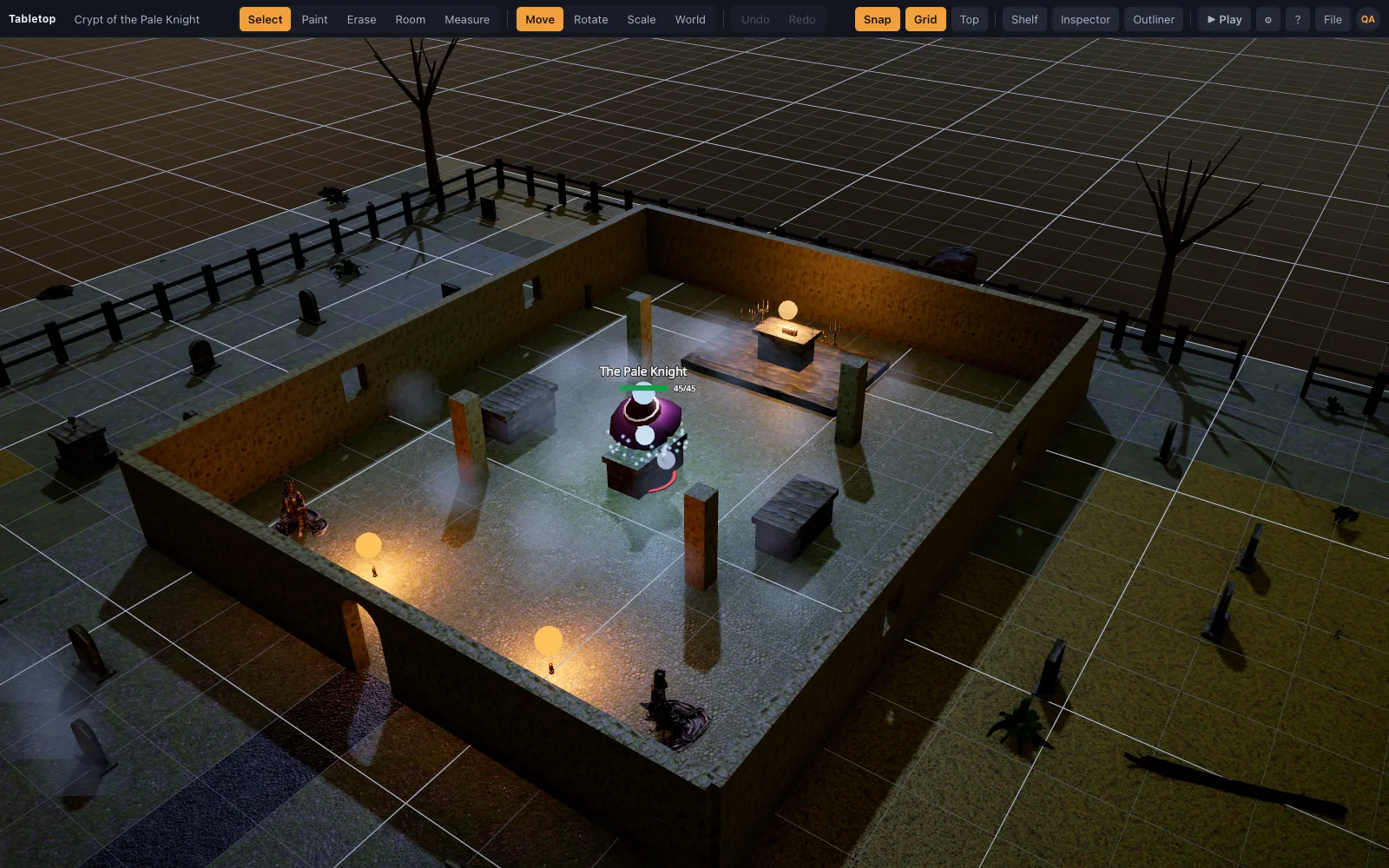
Animated maps were Astral's signature. TerrainTale gets life from light: torches, a sun that casts shadows, a time-of-day slider that turns the same room from noon to midnight while the shadows swing round. At night, a brazier throws light across a crypt floor and the pillars cast shadows over the minis. That is not animation in Astral's sense, but it gives a still map a sense of place. The hour is saved with the scene, so the same crypt can open at dusk one week and at midnight the next.
Not stranded next time
Every scene exports as one JSON file, and the server can be self-hosted, so a table does not depend on one company forever. A JSON export holds the scene: tiles, walls, props, minis, lights and terrain. Import it into another account, or into a self-hosted copy, and the library models download again on that side. The self-hosted server is one Node process with Postgres or an in-process database, so a group with a spare machine can run its own table.
Where Astral was the better pick
Animated image maps in a simple browser tool. TerrainTale has no animated maps; it does have fog of war, brushed on by the DM and revealed as the party explores. Astral was also known for being easy to pick up. TerrainTale aims for that too: the room tool builds a floored, walled room in one drag, and Play mode hides the editor so players see only the map and the tools they need.
Moving across
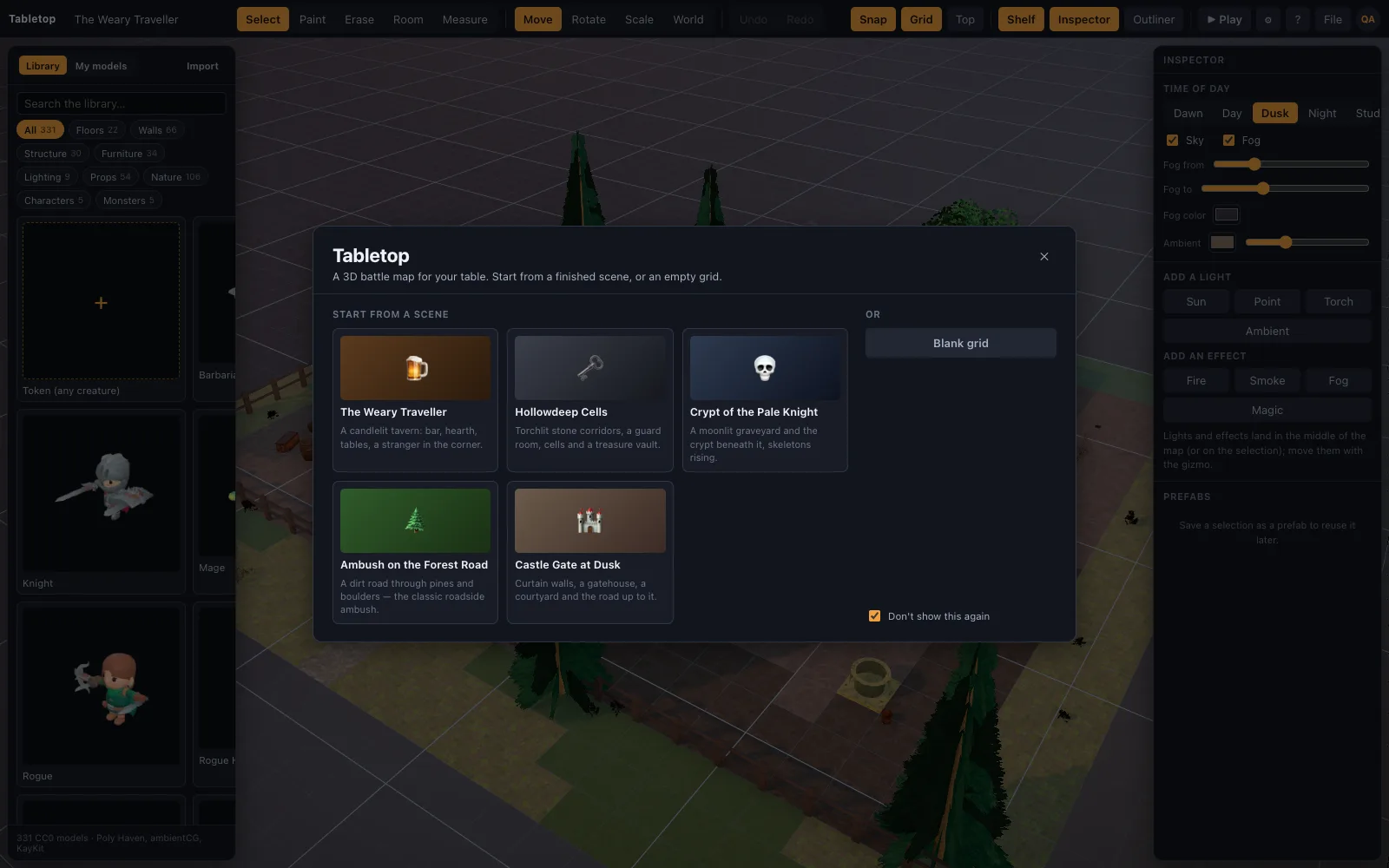
There is no Astral importer. Start from a starter scene, build rooms with the room tool, or import a scene recipe as JSON; token images you own drop on the table as standees. A practical order: open the starter scene closest to your next session, swap a few props, then rebuild the one location that matters most. Uploading your own token images is part of Premium on the hosted site and open on any self-hosted copy.
A first session, step by step
Sign up, open a starter scene or a blank grid, and build the room for your opening fight with the room tool. Place the party and the monsters from the shelf, and set each creature's size so a Large ogre takes a 2 by 2 space. Save the scene, press Share and send the link to your players. When they ask to join, let them in from the card that appears over the map. Press Play and start combat; everyone on the map joins initiative, and the ruler charges the feet each mini moves to its turn.
- Room tool (O) for floors and walls in one drag
- Fog tool (K) to hide rooms the party has not reached
- A dice tray shared with the table
- Hidden minis for an ambush the players should not see yet
Fog of war without a vision system
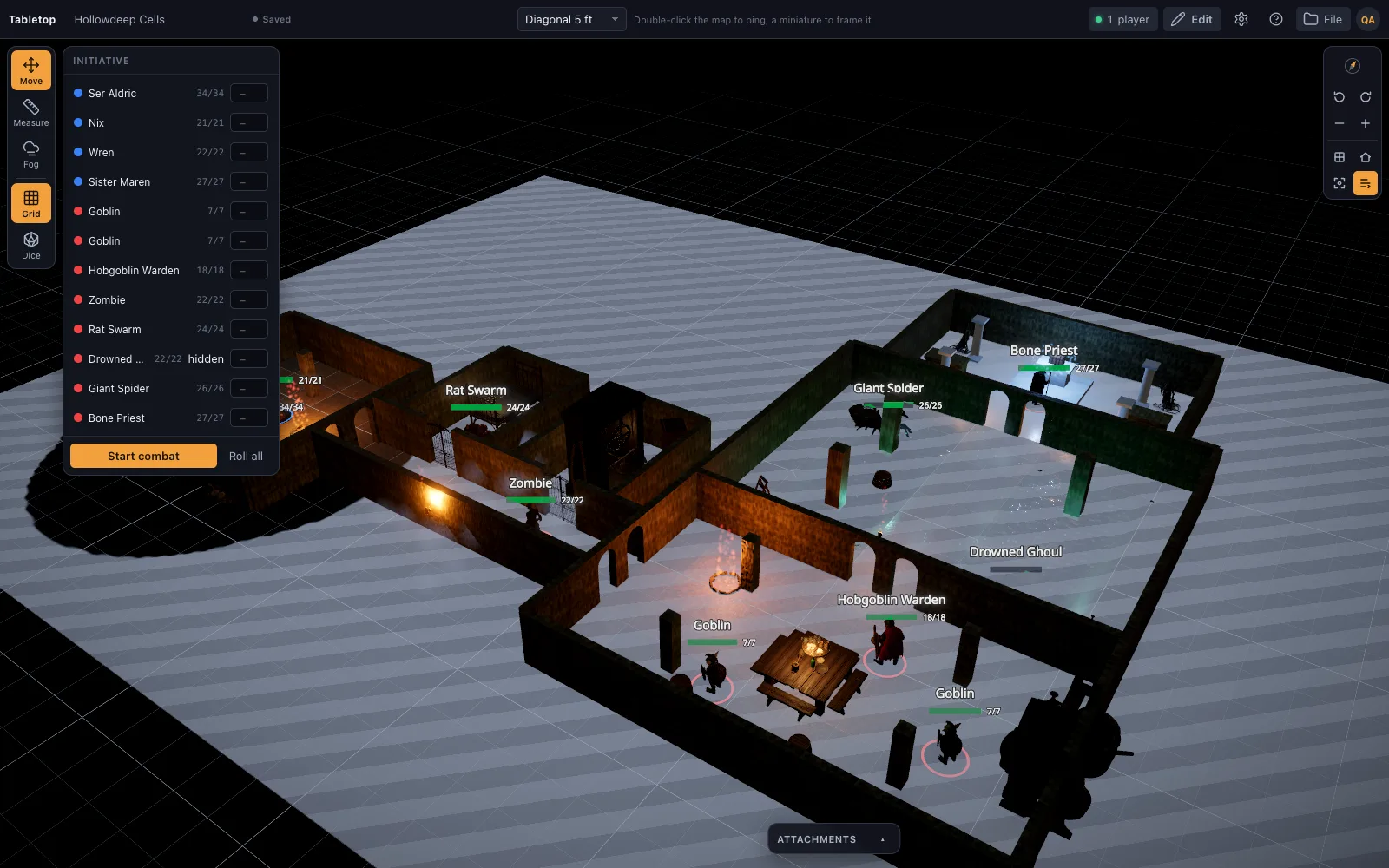
Fog is a brush. The DM covers the map with Fog everything, then reveals each room as the party opens its door, in the editor or mid-game. The owner sees through the fog as a grey veil. Players see black ground, and the minis, props and lights standing in fog are not sent to their browsers at all, so nobody finds them by inspecting the page. Players cannot move a mini into fog. It does not compute line of sight: something tall outside the fog can still be seen over it, and each reveal is the DM's call.
What players need
A modern browser and an account. Players open the link, sign in or sign up, and wait at the door until the DM lets them in. From then on they can drag minis, measure, ping, roll from the dice tray, read token cards and put conditions on unlocked minis. They cannot edit the scene, change HP or run the tracker. Voice stays in the call the group already uses, since TerrainTale has no built-in voice or video.
Questions
Is Astral Tabletop still available?
No. Development stopped in 2021 and the servers closed in 2022.
Can I import my Astral maps?
No. There is no importer.
Can I back up my scenes?
Yes. Each scene exports as a JSON file you can import again.
Is TerrainTale free?
The free plan keeps one saved scene; Premium keeps up to 200 for $6 a month or $48 a year, and also imports your own models.
Does TerrainTale have animated maps?
No. Scenes are lit 3D places rather than animated images. The time of day, torches and shadows carry the atmosphere, and the DM can drag the clock between encounters.
Do players need to install anything?
No. Players open the share link in a browser, sign in, and join once the DM lets them in.
Is there a dice roller?
Yes. A dice tray throws physics dice the whole table sees, with notation such as 2d6+3 and advantage. A free online roller on this site also works without signing in.
Do creature sizes take the right number of squares?
Yes. A Medium creature takes one square and a Large creature a 2 by 2 space, and tokens snap to match. The ruler measures from wherever you start the drag, so reach from the edge of a large space is easy to check.
Keep reading
Free Virtual Tabletop: 3D Maps, No Download, No Seat Licences
A free virtual tabletop in the browser: open a 3D battle map, drag minis, measure in feet, run initiative.
Save, Export and Import D&D Scenes as JSON
Scenes autosave to your account and are also plain JSON: export a scene to a file, import one back, or hand a recipe to an AI assistant.
Self-Hosted 3D Virtual Tabletop
Run TerrainTale yourself: one Node process serves the app, the API and the sign-in gate.
Owlbear Rodeo alternative
Looking for an Owlbear Rodeo alternative with 3D maps? TerrainTale keeps the simplicity (no rules engine, nothing to install) and adds real miniatures, light and height.
FAQ
Accounts, cost, hardware, systems.
From the blog
PBR materials vs. flat textures: why the floors look real
What separates a PBR-generated floor from a flat cartoon texture, and why TerrainTale's 96-piece surface library reads as real stone and marble instead of a painted pattern.
· 5 min read
Prone rules in 5e: standing up, crawling and attacks against you
The prone rules in 5e as the 2024 books write them: what knocks you down, what standing up costs, how crawling works, and how melee and ranged attacks change against a prone creature on the grid.
· 5 min read
Using Meshy AI-generated models on your virtual tabletop
What to do with a model generated by Meshy once you have it: how it imports, what happens to a dense AI-generated mesh automatically, and where it sits next to the library.
· 4 min read
All articles on battle maps, grid rules and running the game
Ready to put a map on the table?
Open the builder and start, no account needed. Sixteen starter scenes are on the welcome screen; sign up free when you want to save one or play it with your group.