Initiative that stays on the map, not in a second tab
Most virtual tabletops make you run combat in a sidebar disconnected from the battle. TerrainTale starts combat and every miniature already on the map is in the order, with HP and conditions a click away on the same screen you are moving minis on.
Start combat, everyone is already in the order
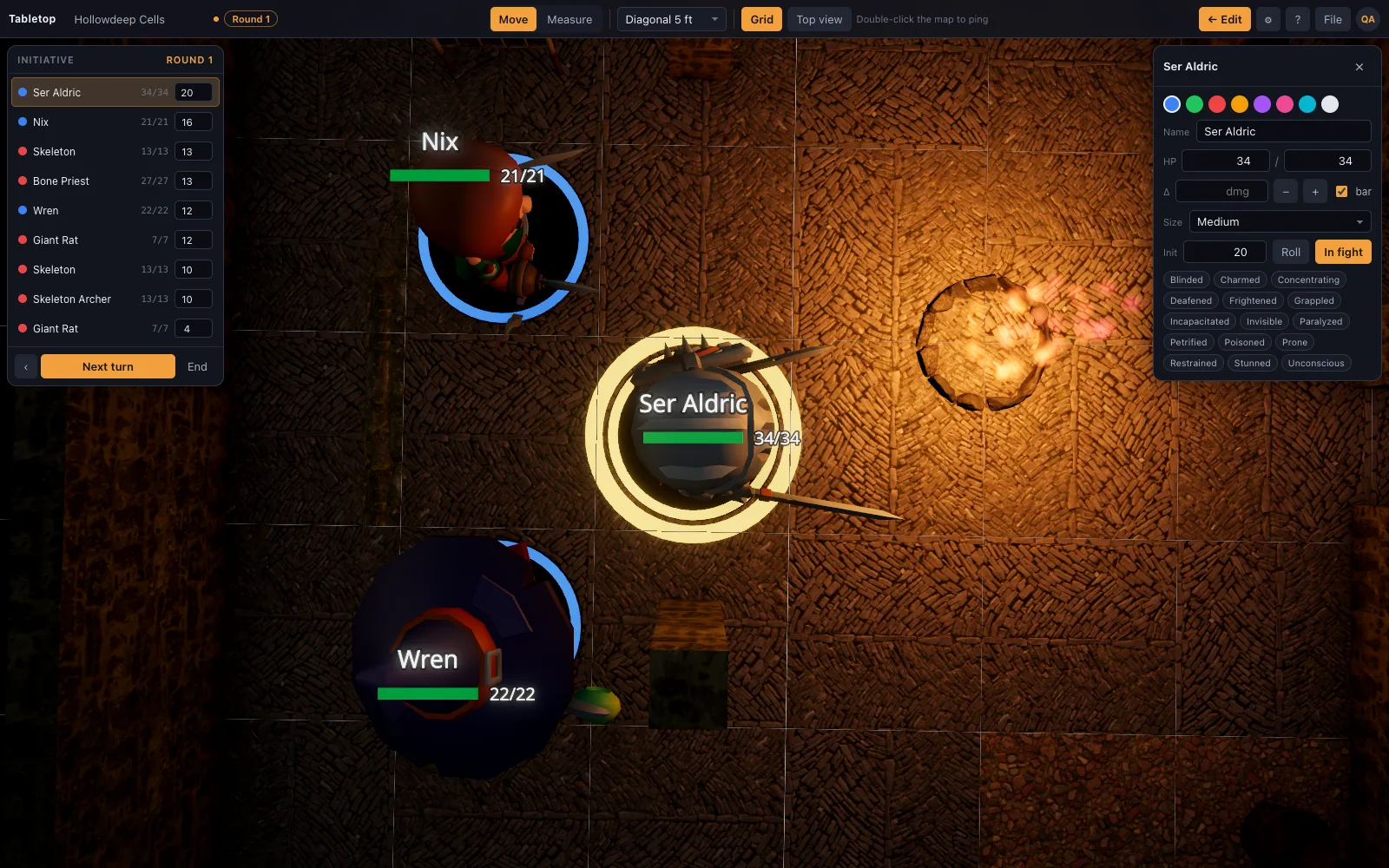
Every miniature on the map joins initiative when combat starts; nothing to add by hand. Roll a d20 or type the number, press N for the next turn, and the current token glows while its movement allowance resets for the new turn. A worked first round: four heroes and three goblins on the map. Start combat and all seven are in the list. Players roll their own d20s, at the table or from the dice tray, and call out the totals; type each one, and roll for the goblins. The highest goes first. The current token glows, its movement resets, and as it is dragged the feet it spends count against its speed. Press N and the next one glows.
HP, conditions and size on the token card
Select a mini for its card: HP with quick damage and heal buttons, a list of conditions, its size, and a portrait. Hostile, ally and neutral rings on the bases make the order readable at a glance without opening anything. Damage works as it does on paper, only faster: a creature with 7 HP takes 5 from a shortsword, you use the damage button for 5, and its card shows 2. Conditions from the 5e 2024 rules, such as prone, grappled or frightened, go on as badges the whole table can see. The tracker keeps them; how long they last and what they do stays your ruling, so note when one should end.
- Round counter and turn pointer in the top bar
- Damage and heal buttons on the token card
- Pings by double-click to point without touching a mini
Works the same in person and over a shared room
The tracker is visible in Play mode on a shared table just as it is for the DM alone, so players watching a shared screen or a shared room see the turn order and pings update live. In a shared room the host runs the tracker. Players watch it and can put conditions on unlocked minis, but they cannot change HP or advance turns. A mini hidden from players, such as an ambusher not yet revealed, sits in the DM's order with a hidden badge while players do not receive it at all, so a surprise stays a surprise until you show it.
Questions
Does it roll attacks or apply damage automatically?
No. It tracks HP, conditions, initiative and movement, and the damage/heal buttons are a click for you to make, but it does not roll attacks or resolve rules. Use the dice tray for rolls the table shares, and your sheets for attack bonuses.
Does it track movement per turn?
Yes. Dragging a mini charges the distance it moved against its turn, so "how far have I gone" has an answer next to its name. The allowance resets at the start of the token's next turn. If a creature Dashes, keep dragging; the tracker shows what was spent and the ruling is yours.
Can players see the tracker in a shared room?
Yes, in Play mode everyone at the table sees the same initiative order live. Players cannot change the order or HP; that stays with the host.
Is it free?
Yes, the tracker is part of the whole table on the free plan; only extra saved scenes and your own models are Premium. Premium is $6 a month or $48 a year.
Keep reading
D&D Virtual Tabletop in 3D
A 3D virtual tabletop built for Dungeons & Dragons: realistic battle maps, painted-miniature figures, a ruler in feet, initiative and HP.
D&D Distance Ruler: Feet, Diagonals, Elevation
Measure distance in feet on a real 3D grid: pick 5e's every-diagonal-5-ft, the 5/10/5 DMG/Pathfinder variant, or true distance.
Play D&D with Friends: Start a Group and Run Your First Night
How to get a D&D group going with friends: who runs it, what to buy (almost nothing), a first adventure, a schedule that survives adult life, and a free 3D battle map for the first fight.
Free Dungeon Master Tools Online: 3D Map, Initiative, HP and Ruler
The DM tools a fight needs, in one browser tab: a 3D battle map you build in minutes, an initiative tracker, HP and conditions, a ruler in feet with height, pings, and an AI that writes scenes.
From the blog
Surprise rules in D&D 2024: Disadvantage on initiative instead of a lost turn
The 5e 2024 surprise rules explained: surprised creatures roll initiative with Disadvantage instead of losing a turn, how Hide and Invisible feed in, and where ambushers must stand on the map.
· 5 min read
How long is a round in D&D 5e, in the game and at the table
A round in D&D 5e lasts six seconds of game time, so a minute is 10 rounds. How long a round really takes at the table, and practical ways a DM can make it shorter without rushing.
· 5 min read
Running combat online without slowing the game to a crawl
Why online fights take twice as long as table fights, and eight concrete changes — turn order, telegraphing, pre-rolled initiative, a shared timer — that get the pace back.
· 7 min read
All articles on battle maps, grid rules and running the game
Ready to put a map on the table?
Open the builder and start, no account needed. Sixteen starter scenes are on the welcome screen; sign up free when you want to save one or play it with your group.