Put a 3D map on the TV and play around it
A screen lying flat on the table, or a projector aimed at it, is the cheapest way to get a beautiful battle map in front of players. TerrainTale is built for that seat: Play mode hides the editor, the top-down view gives a clean overhead, and the DM drags minis as the players describe their moves.
Play mode is a different face
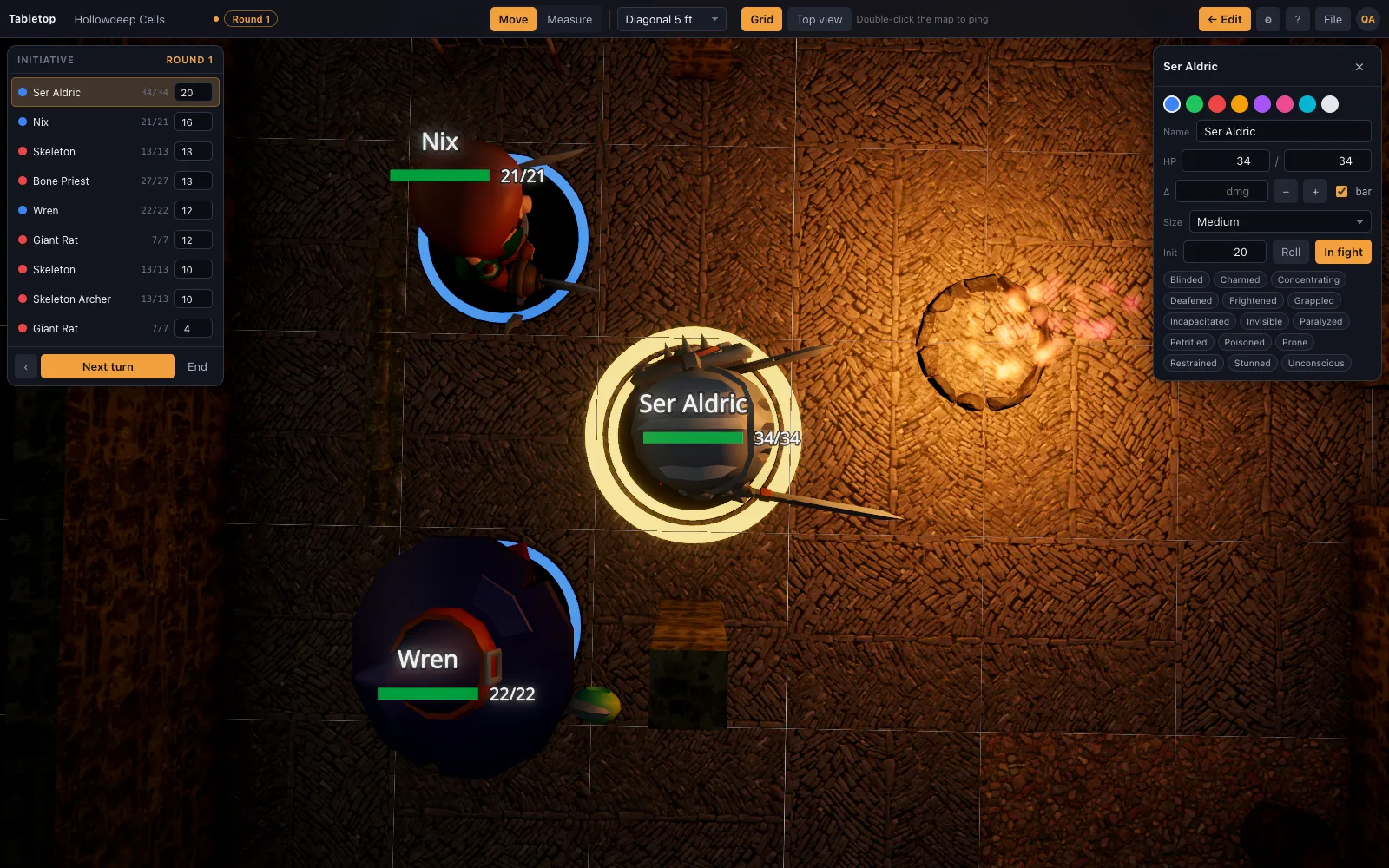
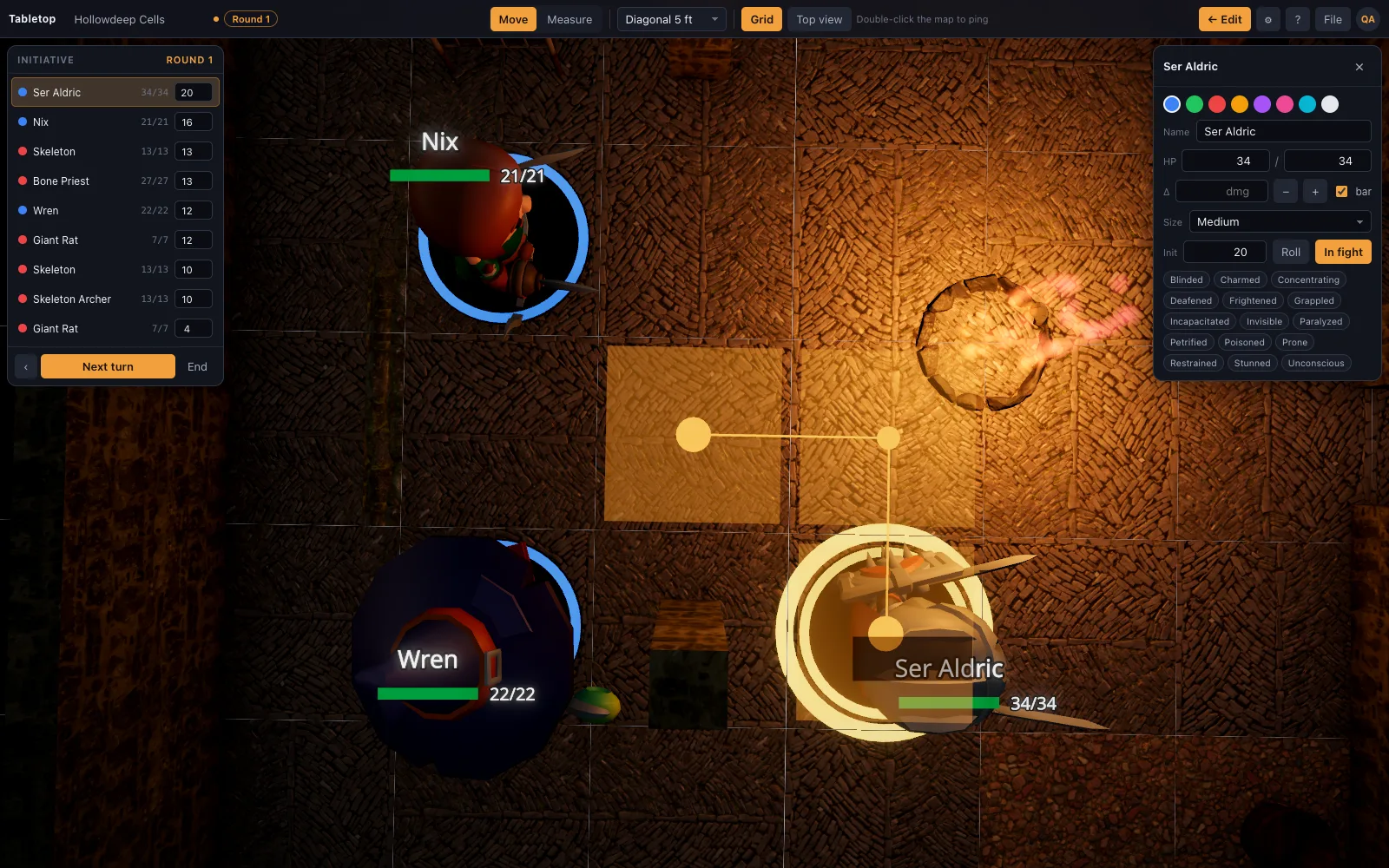
Press P and the shelf, inspector, brush and gizmos disappear. What is left is the map, Move and Measure, a grid toggle, the top-down view, and the initiative tracker. Nothing a player can bump into that edits the scene. A typical setup: the DM sits at a laptop connected to the TV by HDMI. Open the scene, press P, press T for the top-down view and turn the grid on. Players call out their moves; the DM drags each mini and the ruler shows the cost in feet as it goes. Between scenes, press P again to get the editor back, place the next room or open another scene, then return to Play.
Readable from across the table
Base rings in ally, hostile and neutral colours, names and HP next to the mini, a glow on whose turn it is, and a ruler readout in large type. Double-click pings a spot so "that one" has a location. On a 55-inch TV lying flat, a map 20 squares wide gives each square about 6 centimetres, larger than a printed 1-inch grid. Ring colours separate allies from hostiles, so players can count enemies without asking, and the glow on the active mini answers whose turn it is from any chair.
Nothing to install on the TV
Any Chromebook, laptop or mini PC with a modern browser runs it. Quality settings adapt to the GPU, and a low tier still gets soft lighting and real shadows on the minis. If the picture stutters on an older mini PC, lower the quality setting by hand; on a gaming laptop, raise it. Library models download the first time a scene opens, so load the scene before the players arrive. Sign in on the TV machine with the DM's account. The free plan keeps one saved scene, which is enough for one prepared location per session, and exported JSON files hold the rest.
Questions
Can players see it on their own devices?
They can, remotely: share a saved scene by link, players sign in and ask to join, and once let in they see the table live on their own device and can drag their own miniatures. For an in-person group already looking at the same TV, most tables just use the one shared screen. A hybrid table works too: the TV for the people in the room and the share link for one remote player. That player sees the same map and minis live, while the room watches the TV.
Does it work with physical miniatures on top of the screen?
Yes, the top-down view with the grid on is a lit, textured map to put minis on. Use the ruler on screen for distances. A sheet of thin clear acrylic over the screen guards against scratches, and turning the brightness down a little keeps glare off the minis.
Keep reading
D&D Virtual Tabletop in 3D
A 3D virtual tabletop built for Dungeons & Dragons: realistic battle maps, painted-miniature figures, a ruler in feet, initiative and HP.
Free Virtual Tabletop: 3D Maps, No Download, No Seat Licences
A free virtual tabletop in the browser: open a 3D battle map, drag minis, measure in feet, run initiative.
D&D Beyond Maps alternative
Want more than a flat map? A D&D Beyond Maps alternative that builds the battle map in 3D: real walls, torchlight and height, realistic minis, a ruler in feet and initiative.
Features
The builder, play mode, the library and the renderer.
From the blog
Running a D&D map from a ceiling projector instead of a TV
A projector aimed down at the table skips the size limit of a TV. Mounting height and throw distance, keeping the room dim without losing character sheets, and the mat it needs underneath.
· 5 min read
Lighting and vision: making darkness do tactical work
Bright, dim and darkness as game mechanics rather than mood — plus darkvision, light sources with real range, and how to light a map so players walk where you want them to.
· 6 min read
Using a virtual tabletop on a TV at an in-person game
A flat TV, a laptop and one HDMI cable gets you a digital battle map for a table that meets in person. Screen size, viewing angle, scale, glare and the settings that make it readable.
· 6 min read
All articles on battle maps, grid rules and running the game
Ready to put a map on the table?
Open the builder and start, no account needed. Sixteen starter scenes are on the welcome screen; sign up free when you want to save one or play it with your group.