How distance measuring actually works on a 3D table
On a flat map, distance is a ruler you hold up to a picture and a number you argue about. On a 3D table it can be simpler: every model is built to the same five-foot cell, so a drag across the grid is a count of squares, and the count is feet, not an abstraction someone has to convert.
· 5 min read · TerrainTale
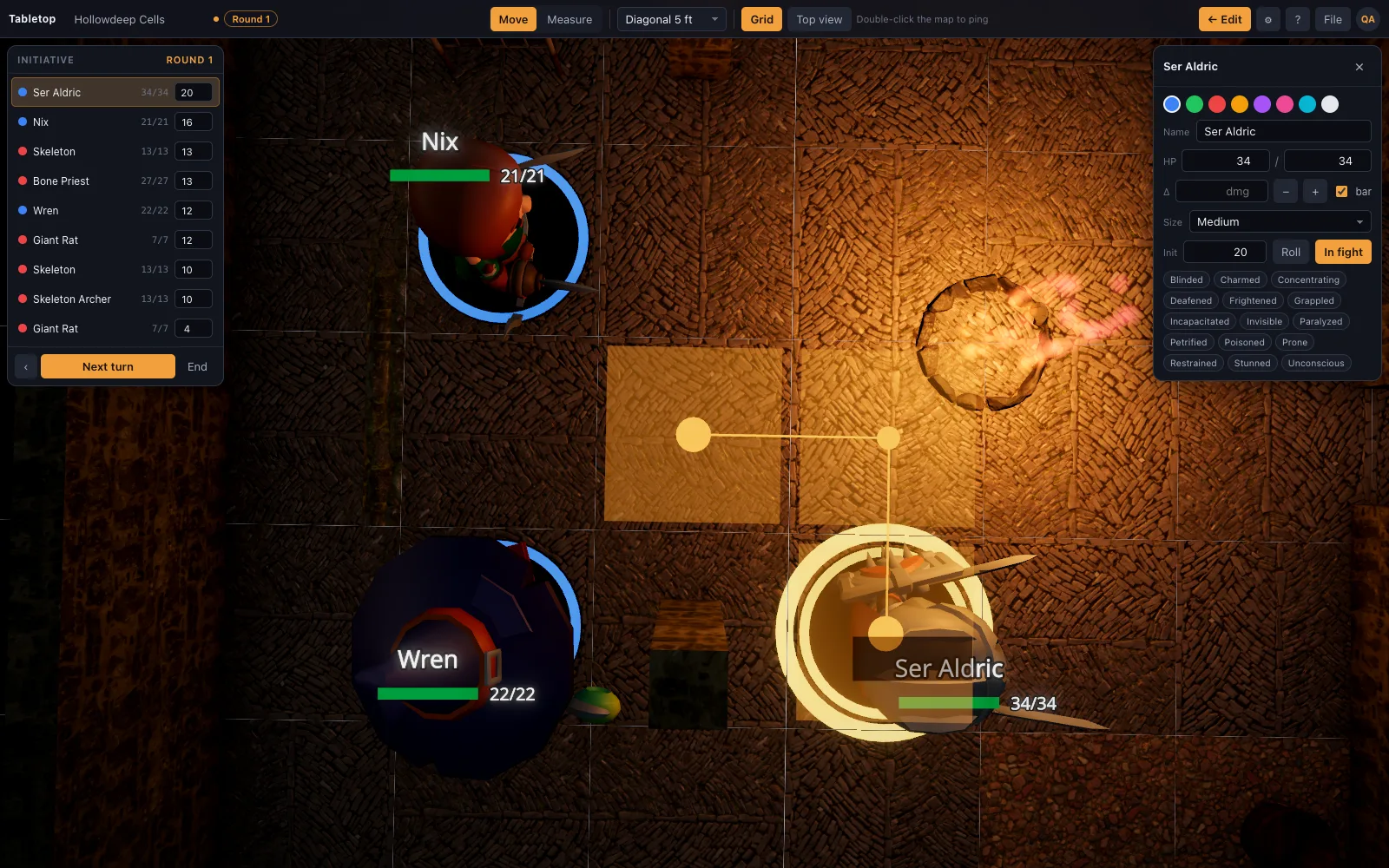
Squares in, feet out
Every floor tile, wall segment and prop in the library is authored to the same 5-foot cell, so a straight drag from one mini to a point on the table counts the squares crossed and reports the total in feet, live, as the drag moves. There is no separate step where someone measures a picture with a ruler and multiplies by a scale factor written in the corner of the map — the scale is already the grid.
This matters most in the moment it usually breaks down: the DM has already described the room, the fighter has already decided to charge, and now everyone waits while someone counts squares on a printed map. On the table, the number is just there, updating as the mini moves.
The reading updates as you drag
Press M to bring up the ruler, or drag a mini directly, and the distance readout tracks continuously rather than only reporting a final total once you let go. That lets a player try a path, see the number climb past their speed, and pull back before committing to a move that would not have worked.
Because the readout is live, it also answers the question players actually ask mid-turn — "can I make it to the door and still swing" — without a separate calculation. The answer is on screen the whole time the mini is being dragged.
Movement is charged per turn
Dragging a mini in combat charges its move against that creature's movement allowance for the current turn, and the allowance resets when initiative advances to the next turn (see the initiative tracker for how turns and rounds are tracked alongside HP and conditions). That is what turns a ruler from a measuring tool into an actual accounting of a turn's movement, rather than a number the table has to remember to subtract by hand.
It also means a DM does not have to police movement separately from measuring it — dragging past a creature's remaining allowance is visible in the same motion as the drag itself, which keeps the bookkeeping out of the conversation.
Your table's own rule for diagonals
5e's default (every diagonal step costs 5 ft, same as a straight step), the DMG's 5/10/5 alternating-diagonal variant used by some tables and by Pathfinder, and true (Euclidean) distance are all settings, not separate tools — pick the one your table plays with once, and every measurement on the map follows it from then on. The differences between those three rules and when to reach for each are worth their own look; see the diagonal-movement comparison below.
The same setting also drives the elevation-aware readout, so a climb to a ledge or a shot up at a flying creature reports height alongside distance rather than just the flat-map number.
Why this matters more once combat starts
Distance questions come up constantly once initiative rolls: can the wizard's spell reach, does the fighter's move put them in melee, is the arrow in range at all. On a printed map each of these is a small interruption — someone reaches for a ruler, counts squares, does the arithmetic for whatever the local diagonal rule happens to be, and reports back. Multiply that by every turn of every round and it adds up to real table time spent measuring instead of playing.
A live, grid-accurate readout removes the interruption without removing the decision. The player still has to decide whether to spend the movement, still has to choose the target, still has to weigh the risk of closing distance under fire — the table just isn't waiting on arithmetic to find out whether the plan is even legal.