Rolling initiative with a 3D die instead of a random number
Initiative decides who acts first for the rest of the fight, so it's one of the rolls a table actually watches. A d20 that gets physically thrown and read off the face that lands, rather than a number that materializes on click, keeps that moment feeling like a roll instead of a lookup.
· 4 min read · TerrainTale
Two different jobs, two different tools
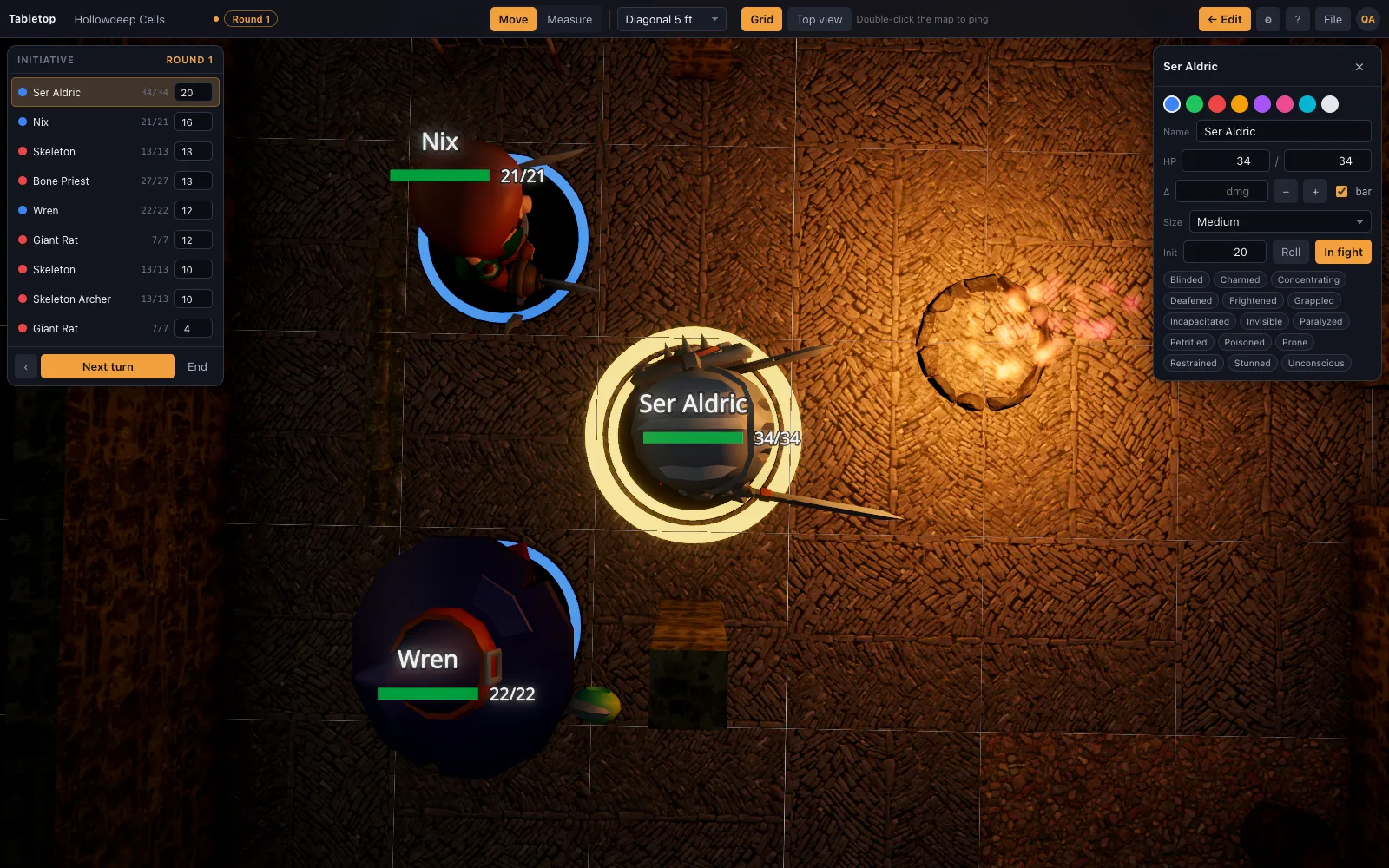
TerrainTale splits initiative into two pieces that don't pretend to be the same thing. The dice roller at /dice-roller throws physical d20s in a browser tray and reads the number off the face that lands up — it's the roll itself. The initiative tracker on the 3D virtual tabletop is where that number, once you have it, gets typed in, ordered against everyone else's, and turns advanced round by round. Neither one fakes what the other does.
Rolling a single d20 for initiative
Add one d20 to the pool, dial in a Dexterity modifier (or whatever your table uses) with the stepper, and roll. The result reads the total plainly, and if the bare d20 happens to land on 20 or 1 the page calls that out as a natural roll — useful context even on an initiative check, where some tables use a natural 20 as a tiebreaker.
A whole party's initiative in one throw
Add multiple d20s to the same pool — one per character or monster group — and roll them together instead of one at a time. The dice roller shows each die's individual value as a separate chip in the result, plus the total of all of them, so you can read off each character's number and hand-key it into the tracker rather than passing a single die around the table.
Why the physical roll matters for this specific moment
Most rolls in a session pass quickly. Initiative is different — everyone at the table is watching it, because it decides the shape of the fight that's about to happen. A roll that's visibly thrown and visibly lands, rather than a number that just appears when you press a button, keeps that specific moment feeling earned rather than assigned, which matters more here than it does for a routine skill check.
Where the number goes next
Once you have a result, the initiative tracker on the 3D table is where it's ordered against the rest of the party and monsters, and where turns advance as the fight goes on. The roller doesn't try to track turn order itself — it's a stand-alone tool, kept in its own tab, that hands you a trustworthy number and gets out of the way.
A quick reroll when initiative resets mid-session
Some tables re-roll initiative every round, or reset it after a scene changes from a chase into a stand-up fight. Clicking directly on the tray throws the same pool again without rebuilding it die by die — useful when you're rolling that same single d20, or the same party-wide pool, more than once in a session.
The last twelve results stay listed underneath the tray too, so if someone at the table asks "wait, what did I roll again?" a few turns into the fight, the answer is right there instead of relying on someone's memory or a scribbled note on a character sheet.